
LLM Skills Marketplace for Claude Code and Codex
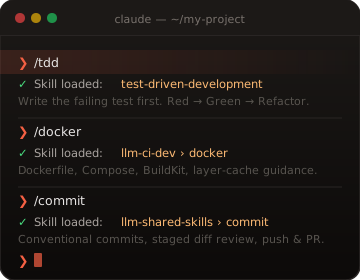
Reusable agent skills for coding, CI/CD, documentation, software design, and web development, installable directly with npx skills, in Claude Code, and in Codex. Teach your agent real engineering practices instead of reinventing them every session.
Every time you start a new conversation, your AI coding agent begins with no memory of the decisions you made last time. You explain your stack, remind it how you want commits structured, walk it through your deployment pipeline, over and over. Skills solve this. A skill is a markdown file that loads into your agent at the start of a conversation and gives it precise, opinionated guidance for a specific domain. Install once, benefit every session.
The skills in this marketplace are production-grade and battle-tested across real engineering workflows. They cover the breadth of a modern software development lifecycle: writing clean, idiomatic code in dozens of languages; designing systems with SOLID principles and domain-driven patterns; building and debugging CI/CD pipelines on GitHub Actions, GitLab CI, Jenkins, and ArgoCD; working with Kubernetes, Helm, Terraform, and cloud CLIs; generating diagrams and technical documents in PlantUML, Mermaid, LaTeX, and Office formats. Each skill is self-contained, composable, and designed to drop into your existing workflow without restructuring how you work.
Skills are grouped into focused bundles: llm-ci-dev for infrastructure and pipelines, llm-software-design for architecture and language best practices, llm-shared-skills for general-purpose tooling, and llm-doc-skills for documentation and publishing workflows. Install the bundles that match your stack, or download everything at once and let your agent discover what it needs.
- Ship a Kubernetes-ready CI/CD playbook Helm, kubectl, Terraform, GitHub Actions, and more, wired together so your agent can draft and troubleshoot real pipelines.
- Enforce SOLID, DDD, and language best practices Design-pattern and per-language guidance that keeps code reviewable instead of clever.
- Generate diagrams and docs that actually render PlantUML, Mermaid, Pandoc, LaTeX, Markdown, and Office skills for design docs, runbooks, and deliverables.
Install directly with npx skills
Use the published skills npm package to install raw skill directories from the GitHub source repositories. This path works for both Claude-compatible and Codex-compatible skills without first registering the marketplace.
Install every bundle
npx skills add alisonaquinas/llm-shared-skills --skill '*' -g -y
npx skills add alisonaquinas/llm-ci-dev --skill '*' -g -y
npx skills add alisonaquinas/llm-software-design --skill '*' -g -y
npx skills add alisonaquinas/llm-doc-skills --skill '*' -g -y
npx skills add alisonaquinas/llm-web-design-skills --skill '*' -g -y
Inspect one bundle before installing
npx skills add alisonaquinas/llm-shared-skills --listnpx skills add alisonaquinas/llm-ci-dev --listnpx skills add alisonaquinas/llm-software-design --listnpx skills add alisonaquinas/llm-doc-skills --listnpx skills add alisonaquinas/llm-web-design-skills --listAdd this marketplace to Claude Code
Use the GitHub repository as the primary marketplace source, then install one of the published skill bundles. Each bundle packages many individual skills and is installed as a single Claude Code plugin. You do not install skills one at a time.
1. Add marketplace (recommended)
/plugin marketplace add alisonaquinas/llm-skillsMarketplace repo: alisonaquinas/llm-skills
2. Install a skill bundle
/plugin install shared-skills@llm-skills/plugin install ci-cd@llm-skills/plugin install software-design@llm-skills/plugin install doc-skills@llm-skills/plugin install web-design-skills@llm-skillsMarketplace URL (secondary option)
/plugin marketplace add https://llm-skills.alisonaquinas.com/marketplace.jsonAdd these skills to Codex
Codex can read this repository as a plugin marketplace. Add the marketplace once, then choose the skill bundles you want from the Codex plugin directory. Each bundle ships a.codex-plugin/plugin.jsonmanifest plus Codex metadata inagents/openai.yaml.
1. Add marketplace (recommended)
codex plugin marketplace add alisonaquinas/llm-skillsMarketplace repo: alisonaquinas/llm-skills
2. Install skill bundles in Codex
Restart Codex, run /plugins, choose Alison's LLM Skills Marketplace, and install the bundles your project needs:shared-skills,ci-cd,software-design,doc-skills, orweb-design-skills.
Published marketplace artifact
The generated Codex marketplace JSON is published at https://llm-skills.alisonaquinas.com/codex-marketplace.json for inspection and deployment. Use the GitHub repository command above for installation.
shared-skills
Cross-compatible LLM skills for Claude Code and Codex: ag, bash, changelog, chatgpt-docs, claude-docs, claude-cli, claude-cli-docs, codex-docs, codex-cli, codex-cli-docs, git, markdownlint, powershell, skill-creator, skill-linting, skill-test-drive, skill-validation, sqlite, zoxide, and many more system utilities.
npx skills add alisonaquinas/llm-shared-skills --skill '*' -g -y/plugin install shared-skills@llm-skillscodex plugin marketplace add alisonaquinas/llm-skillsThen open /plugins and install shared-skills.
ci-cd
Cross-compatible LLM skills for CI/CD pipelines: GitHub Actions, GitLab CI, Jenkins, Docker, Kubernetes, and deployment workflows.
npx skills add alisonaquinas/llm-ci-dev --skill '*' -g -y/plugin install ci-cd@llm-skillscodex plugin marketplace add alisonaquinas/llm-skillsThen open /plugins and install ci-cd.
software-design
Cross-compatible LLM skills for software design, language best practices, and source-level API documentation guidance.
npx skills add alisonaquinas/llm-software-design --skill '*' -g -y/plugin install software-design@llm-skillscodex plugin marketplace add alisonaquinas/llm-skillsThen open /plugins and install software-design.
doc-skills
Cross-compatible LLM skills for document workflows, text-first publishing, host-specific Markdown, and diagram authoring: OOXML, PDF, Pandoc, LaTeX, Typst, Markdown, AsciiDoc, Mermaid, PlantUML, and Graphviz.
npx skills add alisonaquinas/llm-doc-skills --skill '*' -g -y/plugin install doc-skills@llm-skillscodex plugin marketplace add alisonaquinas/llm-skillsThen open /plugins and install doc-skills.
web-design-skills
Cross-compatible LLM skills for modern web design, frontend frameworks, backend frameworks, static sites, UI systems, and web build tooling.
npx skills add alisonaquinas/llm-web-design-skills --skill '*' -g -y/plugin install web-design-skills@llm-skillscodex plugin marketplace add alisonaquinas/llm-skillsThen open /plugins and install web-design-skills.
How agent skills work
A skill is a SKILL.md file plus optional references and scripts that teaches Claude Code or Codex how to handle a focused task. Direct installs use npx skills to copy selected skill directories from GitHub. Claude Code installs skills under~/.claude/skills/ ; Codex loads the same skill content through a plugin bundle with .codex-plugin/plugin.json. When a request matches, the agent loads the relevant skill and follows its instructions for that task.
Installing directly with npx skills is the shortest path for raw skills. Marketplace-backed installs remain available on both platforms: add the marketplace, then install the bundle you need. Claude Code uses /plugin install commands; Codex uses codex plugin marketplace add, then the plugin directory. From that point, sessions can use the skills automatically when the trigger description fits your request.
The bundles stay portable because each skill carries metadata for both agents: agents/claude.yaml for Claude Code and agents/openai.yaml for Codex. The instructions remain plain text, readable, editable, and version-controlled like any other project file.
Browse skills
The full catalog is searchable and filterable by bundle. Or start with one of the five bundles above if you already know the domain you need.